It's Sunday night. You have practice tomorrow at 5:30 PM. You know your team's first round of the season starts Saturday - against a team you've never seen play, in a gym you've never been to.
You open your laptop. Two browser tabs from last week are still open. A half-finished practice plan in a Google Doc. A scouting note in your phone you started typing at the last game and never finished. Your daughter asks when you're coming to dinner.
This is the job. And for the last twenty years, this is also what burned out a lot of good coaches before they ever became great ones.
AI isn't going to coach the team for you. But it's quietly changing which parts of the job take three hours and which parts take twelve minutes - and the coaches who figure that out early are going to spend the back half of this decade with a real edge.
This is a practical look at what's actually happening, what works, and how to start.
What "AI" actually means in coaching
Strip away the hype. When a coaching tool today says "AI," it usually means one of three things:
- A language model (the same kind that powers ChatGPT) that can read your team's data, the web, or your notes - and write something useful back.
- A vision model that can watch game footage and pick out specific events (a pick-and-roll, a turnover, a shot location).
- A planning model that takes constraints you give it ("75-minute practice, U14 boys, focus on defense") and generates a structured output.
That's it. Everything else - "AI scouting reports," "AI play designers," "AI assistant coaches" - is built on those three primitives. The interesting part isn't the technology. It's what coaches are doing with it.
5 real changes happening right now
Here are the five places I see AI showing up in real coaches' weeks. Not "in three years" - this season.
1. Scouting an opponent goes from 3 hours to 30 minutes
The old workflow: Find their schedule. Hunt down a stat sheet on a state association website that looks like it was built in 2003. Try to get film - call a friend, swap with a rival coach, sometimes pay for Hudl access. Watch 90 minutes of game. Type up four pages of notes nobody on staff will read.
The new workflow: Tell an AI tool "My next opponent is the Lakeside Falcons U16 - pull what you can find." It pings their league site, their school site, their state stats site, any social media coverage. Twenty seconds later you have a one-page brief: their record, their leading scorer's tendencies, their typical lineup, what's been written about how they play.
The brief isn't perfect. It misses things. But it gets you 80% of the way in 5% of the time. You spend the time you saved on the 20% that matters - watching the one piece of film you do have, focusing on how they run their stuff, not collecting facts.
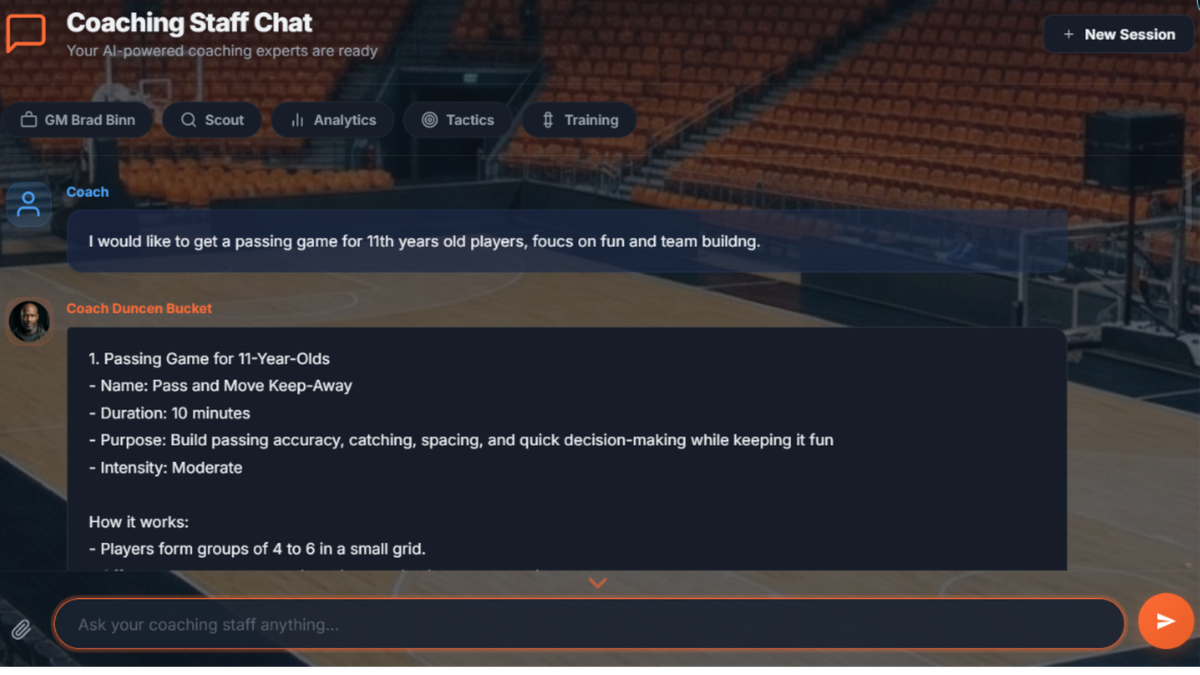
NextPlay's Scout AI is built around this exact loop - it researches your next opponent across the web, organizes what it finds, and writes a brief you can take into the next staff meeting. Coaches use it every week.
2. Practice planning becomes a 10-minute job
This is the change that hits coaches in the chest first, because every coach I know hates planning practices and most are bad at it - not because they don't know what to drill, but because they're doing it at 11 PM after dinner, kids' homework, and a full day of work.
The new workflow: You tell the tool "75 minutes, 12 players, U12 boys, focus on transition defense and inbounds plays." It produces a structured plan: warm-up, skill block, situational block, scrimmage, cool-down - with timing, drill names, and notes. You read it. You change 30%. You print it.
The plan isn't always brilliant. Sometimes it's generic. But two things happen that matter:
- You start with something instead of a blank page. The hardest part of any coaching task is the first 10 minutes of staring.
- You're forced to react to a plan, which is easier than generating one. "No, I don't want to drill that, I want to drill this" - you've now thought more strategically in 3 minutes than you would have in 30.
3. Play design moves into the browser - and into your whole toolset
I drew plays on a whiteboard for fifteen years. I drew plays in PowerPoint for five. I bought standalone drawing software for two. Each tool lived in its own corner - the whiteboard in the gym, PowerPoint on the laptop, the drawing app behind a paywall on a single device.
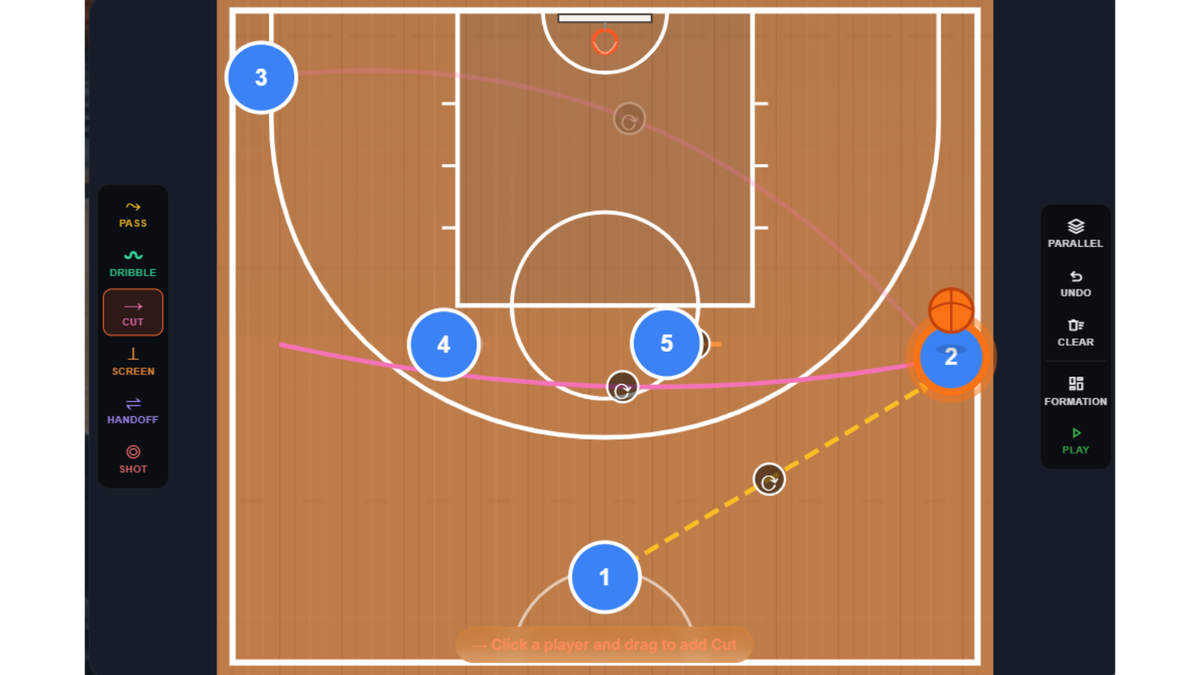
This is the part that's quietly changing now: the plays don't have to live somewhere separate anymore. A modern basketball play designer runs in a browser, animates, and lives in the same place as your roster, your notebook, your scouting reports, and your AI staff.
The "AI" part here is small but honest. Today's tools can't take a sentence like "horns set with a flare screen for the 3" and produce a finished animated play. That's still a few generations away. What today's tools can do is the rest of the workflow around the drawing:
- Draw the play in the browser - no install, no licenses, works on an iPad in the gym.
- Animate it step by step so an assistant or a player actually understands what they're seeing.
- Share it with the staff or print it for a walkthrough.
- Save it next to the rest of your coaching context (roster, notes, video clips) instead of in a folder nobody opens.
That last part is the real shift. A play in isolation is just a diagram. A play in the same workspace as the player profiles, the practice plan, and the scouting report is part of a coaching system.
NextPlay's Play Designer is built around that idea: it's a modern browser-based drawing tool sitting inside the same workspace as the AI Coaching Staff, the notebook, and the team's roster. The drawing part is yours. The AI helps with everything around it.
4. Player development gets individualized
This one is quieter, but probably the biggest deal in the long run.
The historical reality of youth and high school basketball: a head coach has 12-15 kids on the roster, 6 hours a week of practice, no real time to build individualized plans for each kid. The kids who develop fastest are the ones whose parents pay for private trainers.
What's changing: tools that take what you know about a kid - their position, their strengths, their weaknesses, what they did last season, what they need to work on - and produce a personalized 4-week development plan. Drills they can do alone. Things to focus on in practice. Things to ask their parents to help with.
It's not a private trainer. But it's a written, specific, "here's what to work on this month" - for every kid on the roster. Most coaches I've talked to have never given that to a player in their lives, because there were never enough hours in the week.
NextPlay's player profiles and Training AI hook into this loop: every player has a profile with notes, ratings, and growth tracking that the AI uses to draft individual plans you review and share.
5. Everything starts living in one workspace
The fifth change isn't a single AI feature. It's what happens when all the operator work above moves into the same workspace.
For decades, a coach's data lived in seven different places: roster in a Google Sheet, scouting reports in a Word doc, plays in a drawing app or on a whiteboard, practice plans in a calendar invite, notes in a paper notebook, video on an external drive, parents' contact info in your phone. Switching between them was the job. Finding the right file before practice was the job.
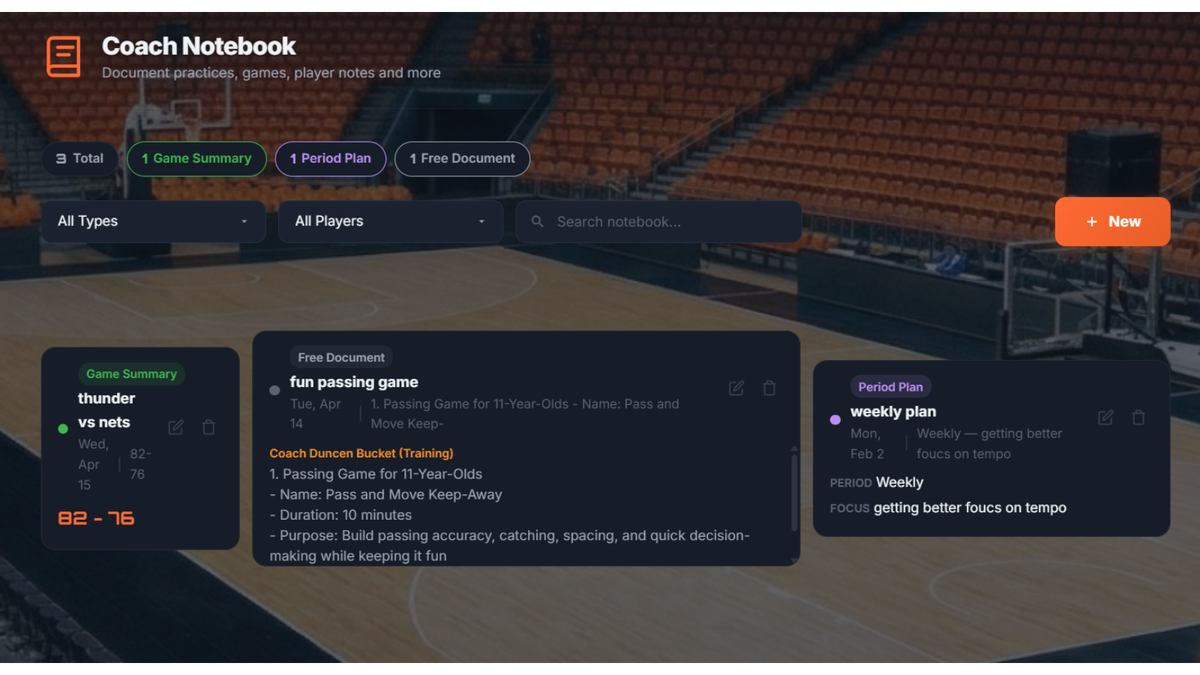
The shift now: a coaching platform where the team's roster, the notebook, the playbook, the scouting reports, and the video library all live next to each other - not because some magical AI links them, but because they were built to share one workspace from the start.
What that looks like in practice:
- You upload your game footage into the same product that holds your roster and your notes. No more Game Film folder on an external drive nobody touches.
- A basketball scouting report you ran on next week's opponent sits next to the play diagram you sketched in response to it.
- The notebook entry from Tuesday's practice is one click away from the playbook you reviewed before that practice.
- Video today is the simplest layer: a centralized library that lives with the team's data. The AI doesn't yet tag clips by player or auto-cut highlights - that's where the product is heading, not where it is today. The value right now is knowing where the footage is, and having it sitting next to everything else about that team.
This consolidation is the quiet part of the shift. It's not flashy. It's not "AI did something I couldn't do." It's just less friction - and across a season, that adds up to dozens of hours that used to go into shuffling files.
NextPlay's Video Hub today is a simple, centralized place for basketball video analysis - keeping your team's footage alongside the roster, the notebook, the playbook, and the scouting reports - so you stop hunting for files. Per-player tagging and AI-assisted search are on the roadmap; the value today is consolidation.
What AI is bad at (and probably always will be)
Equal time. Here's where AI doesn't help, and won't, for a long time:
- Reading a kid in the locker room. Knowing when to push, when to back off, when a kid needs a hug vs. a hard conversation - this is the core of the job, and the part no model touches.
- Leadership. A team follows a coach because of who that coach is. AI can't be present. It can't get pissed off. It can't be inspired. It can't choose to start a kid who isn't the most talented because she's earned it.
- Parents. Every coach knows what I mean.
- Standards. What you accept and what you don't. What "the right way to do it" is. That comes from you, and it shows up in every drill, every huddle, every weekend bus ride.
- The kids' relationship with you. Twenty years from now, they won't remember the practice plan. They'll remember whether you saw them.
If AI tools start to feel like they're replacing those things, they're being used wrong. They're a layer under the coaching, not in place of it.
How to start this week
If any of this resonated, here are three things you can do in the next seven days that don't require buying anything, signing up for anything, or learning anything technical:
1. Try one practice plan. Open ChatGPT, Claude, or any coaching-specific tool. Tell it your context - age, level, length of practice, focus. Read what it gives you. Change everything you'd change. Run the practice. See what worked.
2. Generate a scouting brief for your next opponent. Same idea. Ask for the basics: their record, who scores, what they run, recent games. Compare it against what you find on your own. Notice which is faster.
3. Talk to your staff about it. The biggest mistake I see is coaches treating AI tools as a private thing - "my AI assistant." It works much better when it's the staff's tool. Your assistant coach should be using the same workflow. Your scout should be feeding it the same intel. The coaches who win the most with this stuff are the ones who turn it into a shared layer across the staff.
Where this is going
The coaches I respect have always been one part teacher, one part strategist, one part operator. The teacher and strategist parts of the job aren't going anywhere. The operator part - the paperwork, the planning, the scouting, the bookkeeping - is the part AI is quietly eating.
That's a good thing. Those hours go back into the parts of the job that actually matter.
I built NextPlay, AI for basketball coaches, with this exact bet in mind: five specialist AI coaches that work alongside you, on your team's data, doing the operator work - so you can spend Sunday night with your family instead of in front of a laptop.
If that resonates, try it. You can chat with the basketball AI right now, free and without signing up - and the full staff is free for 14 days, no card.